TCL Official TV Remote App
TCL GroupVideo Players & Editors
4.5318.00 Reviews
- Version
- 2.0.198
- Installs
- 10.00M
- Age Rating
- Everyone
Screenshots
Our Review of TCL Official TV Remote App
 Analysis by Appyee
I found TCL Official TV Remote App most useful in the kind of home where the television remote is constantly moving. One person leaves it beside the sofa, another carries it into the kitchen, and someone else is already asking who changed the input. This app turns an Android phone into a practical companion for a compatible TCL Roku TV, while also adding ways to send local videos, music, and photos to the television. I tested it with that shared-device mindset rather than treating it as a simple replacement for a lost remote.
The first thing to understand is its focus. This is not a general remote that promises to control every television in the house. It is an official tool from TCL Group for TCL Roku TV use, and that narrow purpose is also its main strength. If your television fits that ecosystem, the app can be more convenient than searching for a physical controller. If your home has several brands or older equipment, its usefulness becomes much more limited.
How it fits into a shared living room
In everyday use, the most convincing scenario is a household with one main TCL Roku TV and several people who need access at different times. I can imagine using a phone to adjust volume while another person is holding the physical remote, or opening the app when the original controller has disappeared under a cushion. The phone is already a personal object, so it is often easier to find than a small black remote.
The app also makes the television feel less tied to one particular person. A household member can use the remote functions from their own phone instead of waiting for whoever currently has the controller. That is helpful during ordinary moments such as choosing a different input, browsing entertainment, or lowering the volume without interrupting a conversation.
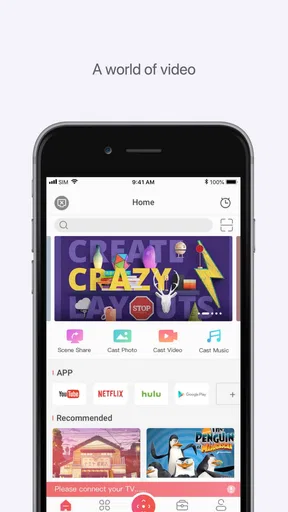
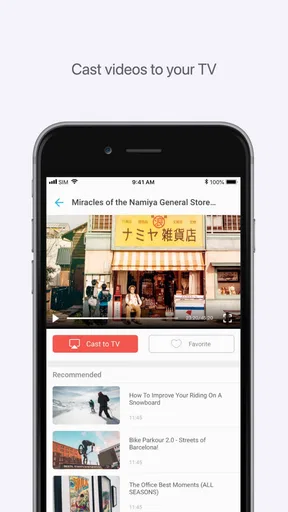
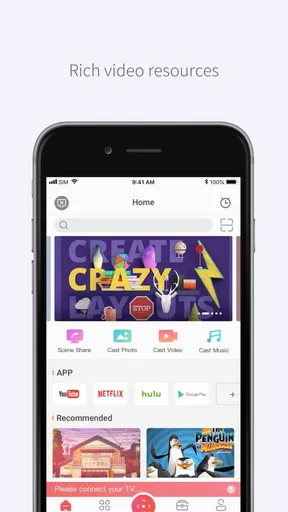
Its local media tools give the shared screen a second role. Photos, music, and videos stored on a phone can be cast to the TV, which is useful when several people want to look at the same material together. I would use that for showing holiday pictures, playing a personal video for the room, or putting music on the larger television system without passing the phone around.
There is an important household distinction here: the app helps with shared access to the TV, but that does not automatically mean shared access to every account or service used through the television. The phone becomes a control surface. It should not be treated as a universal key to everyone’s streaming profiles, private media, or personal settings.
That boundary matters more than it may seem. If several people use the same television, I would agree in advance about who is casting content and when. A phone can make control quicker, but quick control can also create confusion if two people are trying to direct the screen at once. The app works best when the household treats it as a convenient remote, not as a replacement for communication.
What the first setup is really like
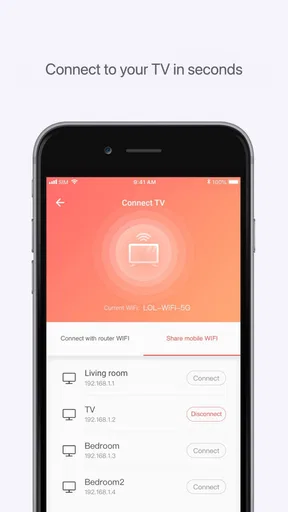
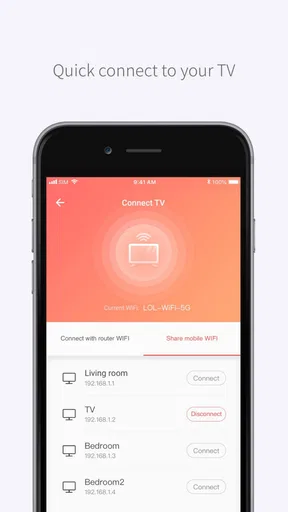
The app is free to install, and its content rating is Everyone, which makes it approachable for a broad household. It is available for Android devices running version 7.0 or later. I would still begin setup with the main television and phone in the same room, because that makes it much easier to see whether the intended TCL Roku TV is being recognized and to confirm that commands are reaching the correct screen.
Before expecting it to work, I would check the basic compatibility question: is the television actually a TCL Roku TV? The short description calls it a TCL TV Remote, but the fuller purpose is more specific. That distinction can save time. A person with a TCL television using a different smart-TV platform should not assume that the app will behave like a universal controller simply because the brand name matches.
I also recommend deciding which phone should be used for initial setup. In a shared home, the first device connected is often the one everyone starts relying on, even if it belongs to only one person. A better approach is to treat the app as an individual remote on each participating phone, then agree on a primary device for casting. That reduces the chance of someone sending personal media to the shared screen by mistake.
Network conditions are another practical consideration. Remote and casting apps depend on the phone and television being able to communicate properly. If the television is visible but commands feel delayed, I would first check the home network arrangement rather than repeatedly tapping buttons. Reopening the app, checking that the phone is connected to the expected home network, and keeping the TV awake are sensible first steps.
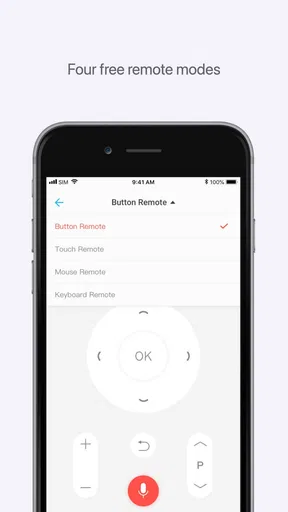
One non-obvious advantage of using a phone is that it can be easier to handle text entry than a physical TV remote. Whenever the television asks for a search phrase or another short entry, a phone keyboard is generally more comfortable than moving through letters with directional buttons. I would not choose this app solely for that reason, but it is one of the small improvements that can make occasional TV use less frustrating.
Keeping control clear between household members
Shared-device use becomes smoother when each person understands what the app controls and what remains personal. The remote functions affect the television itself: volume, navigation, playback, and other ordinary actions associated with operating the screen. Casting local media affects what everyone in the room sees. Those are different kinds of control and deserve different habits.
For example, I would use the remote side when helping a child find a program or when changing the input for someone else. I would use the local media side only after checking that the selected photo or video is suitable for the whole room. That small pause is worthwhile because the television is a public surface inside the home, even when the source material lives on one person’s phone.
The app is not a substitute for household rules. It does not turn a shared TV into a managed family environment, and I would not assume that its Everyone rating means every media choice made through it is appropriate for every age. The rating describes the app’s general suitability, while the content sent to the screen depends on the user.
This is especially relevant when children borrow an adult’s phone. I would explain the difference between operating the television and opening personal content on the phone. If a child only needs to adjust volume or pause playback, that is a simple use case. Casting from a private photo library is a separate decision and should remain under the owner’s supervision.
Older relatives can benefit from the same clarity. A phone-based remote may be easier to locate and can offer a familiar touch interface, but it also introduces a different control style from the traditional remote. I would set up the phone with the person beside the television, show only the essential controls, and avoid assuming that a larger feature set automatically means a simpler experience.
For guests, I would be selective. Giving every visitor control of the TV can be convenient during a gathering, but it can also lead to accidental changes or competing commands. In my view, one designated phone should handle casting while others use the physical remote or ask the person coordinating the screen. That arrangement keeps the shared display predictable.
Using local photos, music, and video sensibly
The local casting tools are where this app becomes more than a basic remote. They are designed around media already stored on the phone, so I see them as useful for spontaneous sharing rather than as a full replacement for a dedicated media library. The best moments are informal: a short clip that is too good for everyone to crowd around a phone, a set of photos from a recent outing, or music chosen for the room.
I would prepare the media before handing the phone to someone else. Open the intended album or file first, check the order, and make sure the television is the selected destination. That workflow reduces the chance of scrolling through unrelated personal material while everyone is waiting. It also makes casting feel intentional instead of like an experiment in front of the whole household.
A useful trade-off is privacy versus convenience. Local casting avoids the need to upload a file to another service just to show it on the TV, which can be reassuring for personal photos. At the same time, anything displayed on a shared screen is visible to everyone nearby. I would never use the living-room television for private material merely because the app makes sending it easy.
Another practical tip is to treat short sessions differently from long viewing. For a quick photo review, the phone is a natural controller because the source and destination are close at hand. For a long film or extended listening session, I would prefer the television’s normal playback environment when possible, because constantly keeping a phone available can become an unnecessary distraction.
Local media casting also makes the app attractive for people who do not want to learn a separate television interface just to show something they already have on their phone. That simplicity is a real benefit. However, it does not make the app a complete video editor, media organizer, or streaming catalog. Its value comes from moving personal media to the TCL Roku TV, not from replacing every tool around that process.
Where it stands beside ordinary alternatives
The obvious alternative is the physical remote that came with the television. That controller remains the better choice when the phone is being charged, the network is unavailable, or someone wants immediate tactile buttons without unlocking a device. It is also more suitable for a guest who should operate the TV without gaining access to a personal phone.
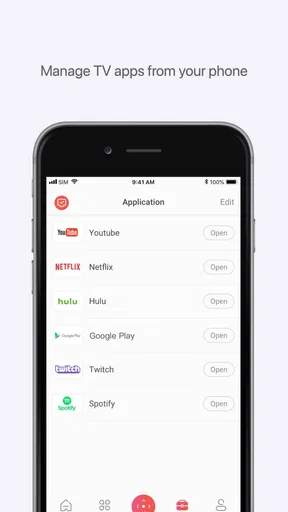
The phone app wins when the physical remote is missing, when text entry would be tedious, or when local photos, music, and video need to reach the larger screen. It can also be more convenient for someone who already keeps the phone nearby. In a busy household, that convenience may matter more than having one extra device on the coffee table.
Compared with broad universal-remote apps, this one has a clearer identity. Its official connection to TCL Group is reassuring for owners of the intended television family, but the focused compatibility means it is not the best answer for a mixed-brand entertainment center. If you need one app to operate a television, sound system, streaming box, and other equipment from different manufacturers, a universal solution may fit better.
Compared with platform-neutral casting tools, this app has the benefit of combining television control with local media sharing in one place. The trade-off is that its usefulness depends heavily on the TCL Roku TV relationship. I would choose it for a TCL-centered living room, not as the first app for a home built around several unrelated platforms.
Its current version is 2.0.198, and the app has reached over ten million installs with a 4.5 average from around 162 thousand ratings. Those figures suggest that it is not an obscure experiment, but popularity should not replace the compatibility check. A highly used app can still be the wrong tool for a television outside its intended setup.
Costs, expectations, and everyday friction
The basic app is free, which makes trying it relatively low-risk. It also includes in-app purchases ranging from $1.99 to $5.99 per item. I would therefore install it first for the core remote and casting experience, then decide whether any optional purchase is worthwhile for my own routine rather than assuming that every household needs to spend money.
That pricing detail is worth keeping in mind in a family setting. If several people use the app, agree on who, if anyone, should make an in-app purchase. A free installation can still create confusion when one person expects access to something another person paid for. Clear expectations are more useful than treating the app as a shared account by default.
The main friction is not the number of tools but the dependence on the right combination of devices and network conditions. A physical remote is usually more direct when the television is not responding. The phone app also requires the user to keep the phone available, unlocked or ready for use, and separate from whatever else they are doing. That is a small burden, but it becomes noticeable during frequent channel or volume changes.
I would also avoid presenting it as a replacement for every remote-related problem. It cannot make an incompatible television compatible, and it does not remove the need to understand which device is currently receiving the command. In a home with multiple TCL Roku TVs, careful selection becomes especially important so that a command intended for one room does not affect another.
For troubleshooting, I would use a simple order: confirm the intended TV, check the phone’s network connection, close and reopen the app, and test a basic command before trying casting. If basic remote control works but local media does not, I would review the selected file and destination rather than assuming the entire connection has failed. Separating those two functions makes problems easier to diagnose.
Who should use it and who should skip it
I recommend it to TCL Roku TV owners who regularly misplace the physical remote, want easier phone-based control, or often show local photos and videos to other people in the room. It is particularly sensible for a shared household that can agree on a primary casting phone and simple rules about who controls the screen.
It is also a good fit for someone who dislikes entering searches with directional buttons. The phone interface can make occasional text-heavy TV tasks less awkward, and the ability to keep a familiar device in hand may reduce the learning curve for some users.
I would skip it if your main television is not a compatible TCL Roku TV, if your household strongly prefers physical buttons, or if you need one controller for a complicated collection of brands. I would also look elsewhere if your priority is advanced media management rather than straightforward local casting. The app is focused, and that focus is helpful only when it matches the way you use your TV.
Families should use it with sensible supervision rather than assuming that an Everyone rating solves age-related concerns. The app can be appropriate for general household use, but the person controlling the phone still decides what appears on the shared screen. That distinction is simple and important.
My household verdict
After looking at it as a shared-home tool, I see TCL Official TV Remote App as a practical companion rather than a complete entertainment system. Its strongest idea is putting two useful jobs together: controlling a compatible TCL Roku TV and sending local phone media to it. That combination is more valuable than either function alone when the television is used by several people.
The app is at its best when the household sets clear boundaries. Choose a primary casting device, confirm the correct television before sending commands, and remember that phone ownership and TV control are not the same thing. Those habits prevent most of the awkward moments that can arise when a personal device becomes a shared-screen controller.
Its limitations are equally clear. The experience depends on compatibility, network communication, and a phone being available. The physical remote remains more immediate in some situations, while a universal remote is better for mixed equipment. The local media tools are convenient, but they do not turn the app into a full media library or a family-management system.
For the right home, I would install it. The free entry point, official TCL connection, Everyone rating, and broad adoption make it an easy option to try, while the casting functions give it a reason to stay installed after the missing-remote problem is solved. My recommendation is simple: choose it when your household revolves around a compatible TCL Roku TV and values convenient, coordinated phone control.
Verdict
Strengths of TCL Official TV Remote App
- Works with many TCL TV models and smart TV platforms.
- Provides convenient control when the physical remote is missing.
- Includes quick access to volume, channels, and input selection.
- Simple interface is easy for most users to learn.
- Can reduce the need for extra physical remotes at home.
Limitations of TCL Official TV Remote App
- Requires a compatible TCL TV and supported network connection.
- Phone and TV may need to share the same Wi-Fi network.
- Some features vary depending on the TV model and region.
- Ads or promotional content may appear in the app experience.
- Using the phone as a remote can drain its battery over time.
Similar Picks in This Category
View All
Google TV
Google LLC3.9

iTunes
Apple4.7

YouTube
Google LLC3.8

MX Player
Amazon Mobile LLC4.2

CapCut - Video Editor
Bytedance Pte. Ltd.3.5

PLAYit-All in One Video Player
PLAYIT TECHNOLOGY PTE. LTD.4.5
Frequently Asked Questions
What is the TCL Official TV Remote App, and which televisions does it support?
The TCL Official TV Remote App is a mobile remote-control application designed to let you operate compatible TCL televisions from an Android or iOS phone. Depending on your TV model, region, and installed software, it may support functions such as changing channels, adjusting volume, opening apps, navigating menus, and powering the television on or off. Compatibility should be checked in the app listing or TCL support documentation before downloading.
How do I connect the app to my TCL television?
In most cases, your phone and TCL television must be connected to the same Wi-Fi network. After opening the app, allow it to search for nearby compatible TVs, select your television, and confirm the pairing code shown on the screen if requested. Network isolation, guest Wi-Fi, VPNs, or an outdated TV system can prevent discovery, so both devices should use the same regular home network.
Can the TCL Official TV Remote App replace the physical remote completely?
For everyday controls, the app can often replace a physical remote, especially for navigation, volume, input selection, playback, and launching streaming services. However, available features vary by TCL model and platform. Some televisions may not support power control through the app, while others require the TV to remain in standby or have network-wake settings enabled. Keeping the original remote is advisable for setup and troubleshooting.
Does the app work when my phone and TV are connected to different networks?
Usually, the app communicates with the television through the local Wi-Fi network, so the phone and TV generally need to be connected to the same network. It normally will not control a TV across mobile data or from another location. If pairing fails, check that the phone is not using cellular data, the TV is not connected to a guest network, and router settings are not blocking device-to-device communication.
Is the TCL Official TV Remote App free and safe to use?
The official app is generally available to download without an upfront purchase, although features, advertising, or regional availability may differ between Android and iOS versions. For safety, install it only from Google Play or the Apple App Store and verify that the developer is TCL or an officially affiliated publisher. Review requested permissions, use the latest version, and avoid unofficial remote apps claiming to be TCL products.
